So I wanted to add custom options to the Omarchy system menu.
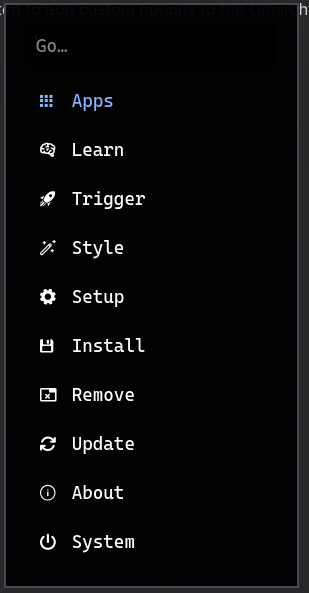
What I’d like to have here is custom options for adding controls to connect to some Bluetooth devices that I use daily (my headphones and a soundbar.)
Dotfiles configuration
The Omarchy system options menu lives at .local/share/omarchy/bin/omarchy-menu
I started by moving this to my dotfiles repo at dotfiles/Omarchy-overrides/.local/share/omarchy/bin. This will allow me to place the folder back by running stow Omarchy-overrides and it will place the file back to it’s original directory.
Config Changes
Main Menu
The main menu section looks like this.
show_main_menu() {
go_to_menu "$(menu "Go" " Apps\n Learn\n Trigger\n Style\n Setup\n Install\n Remove\n Update\n About\n System")"
}The “ Connect\n” section is what we added.
show_main_menu() {
go_to_menu "$(menu "Go" "Connect\n Apps\n Learn\n Trigger\n Style\n Setup\n Install\n Remove\n Update\n About\n System")"
}”Go to” logic
go_to_menu() {
  case "${1,,}" in
  *apps*) walker -p "Launch…" ;;
  *learn*) show_learn_menu ;;
  *trigger*) show_trigger_menu ;;
  *share*) show_share_menu ;;
  *style*) show_style_menu ;;
  *theme*) show_theme_menu ;;
  *screenshot*) show_screenshot_menu ;;
  *screenrecord*) show_screenrecord_menu ;;
  *setup*) show_setup_menu ;;
  *power*) show_setup_power_menu ;;
  *install*) show_install_menu ;;
  *remove*) show_remove_menu ;;
  *update*) show_update_menu ;;
  *about*) omarchy-launch-about ;;
  *system*) show_system_menu ;;
  esac
}
We added in the “connect” logic to this,
*connect*) show_connect_menu ;;“show_connect_menu” itself
I’ll also need to create our menu itself, we’ll do this by making a new menu section overall.
show_connect_menu() {
SOUND_BAR_MAC="$SOUNDBAR"
HEADPHONES_MAC="$HEADPHONES"
case $(menu "Connect" " Soundbar\n Headphones") in
*Soundbar*)
present_terminal "
echo 'Switching to Soundbar...';
bluetoothctl disconnect $HEADPHONES_MAC >/dev/null 2>&1 || true;
bluetoothctl connect $SOUND_BAR_MAC \
&& exit 0 \
|| { echo '❌ Failed to connect to Soundbar'; read -n1; }
"
;;
*Headphones*)
present_terminal "
echo 'Switching to Headphones...';
bluetoothctl disconnect $SOUND_BAR_MAC >/dev/null 2>&1 || true;
bluetoothctl connect $HEADPHONES_MAC \
&& exit 0 \
|| { echo '❌ Failed to connect to Headphones'; read -n1; }
"
;;
*)
show_main_menu ;;
esac
}HINT
For the variables of
$SOUNDBARand$HEADPHONESyou are able to get this list frombluetoothctl devicesif they’re already paired with your system.
Success
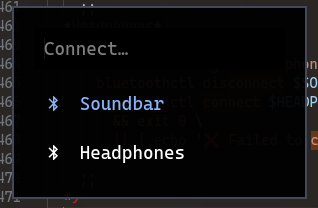
We’re rolling! Works like a charm.