I wanted to migrate my massive Google Photos Library to a self hosted solution, I was tired of being so tied to Google, so here we go.
Initial Setup
I spun up a standard Immich instance using Portainer (yea, I was lazy but it works)
name: immich

networks:
  default:
    external: true
    name: "default"
  rickroll:
    external: true
    name: "rickroll"  # The internal communication network

services:
  immich-server:
    hostname: immich
    container_name: immich_server
    ports:
      - 2283:2283
    image: ghcr.io/immich-app/immich-server:${IMMICH_VERSION:-release}
    # extends:
    #   file: hwaccel.transcoding.yml
    #   service: cpu # set to one of [nvenc, quicksync, rkmpp, vaapi, vaapi-wsl] for accelerated transcoding
    volumes:
      # Do not edit the next line. If you want to change the media storage location on your system, edit the value of UPLOAD_LOCATION in the .env file
      - ${UPLOAD_LOCATION}:/data
      - /etc/localtime:/etc/localtime:ro
    env_file:
      - stack.env
    depends_on:
      - redis
      - database
    restart: always
    healthcheck:
      disable: false
    networks:
      - default
      - rickroll

  immich-machine-learning:
    container_name: immich_machine_learning
    # For hardware acceleration, add one of -[armnn, cuda, rocm, openvino, rknn] to the image tag.
    # Example tag: ${IMMICH_VERSION:-release}-cuda
    image: ghcr.io/immich-app/immich-machine-learning:${IMMICH_VERSION:-release}
    # extends: # uncomment this section for hardware acceleration - see https://docs.immich.app/features/ml-hardware-acceleration
    #   file: hwaccel.ml.yml
    #   service: cpu # set to one of [armnn, cuda, rocm, openvino, openvino-wsl, rknn] for accelerated inference - use the `-wsl` version for WSL2 where applicable
    volumes:
      - model-cache:/cache
    env_file:
      - stack.env
    restart: always
    healthcheck:
      disable: false
    networks:
      - rickroll


  redis:
    container_name: immich_redis
    image: docker.io/valkey/valkey:9@sha256:fb8d272e529ea567b9bf1302245796f21a2672b8368ca3fcb938ac334e613c8f
    healthcheck:
      test: redis-cli ping || exit 1
    restart: always
    networks:
      - rickroll

  database:
    container_name: immich_postgres
    image: ghcr.io/immich-app/postgres:14-vectorchord0.4.3-pgvectors0.2.0@sha256:bcf63357191b76a916ae5eb93464d65c07511da41e3bf7a8416db519b40b1c23
    environment:
      POSTGRES_PASSWORD: ${DB_PASSWORD}
      POSTGRES_USER: ${DB_USERNAME}
      POSTGRES_DB: ${DB_DATABASE_NAME}
      POSTGRES_INITDB_ARGS: '--data-checksums'
      # Uncomment the DB_STORAGE_TYPE: 'HDD' var if your database isn't stored on SSDs
      # DB_STORAGE_TYPE: 'HDD'
    volumes:
      # Do not edit the next line. If you want to change the database storage location on your system, edit the value of DB_DATA_LOCATION in the .env file
      - ${DB_DATA_LOCATION}:/var/lib/postgresql/data
    shm_size: 128mb
    restart: always
    networks:
      - rickroll

volumes:
  model-cache:
After getting this setup I used nginx proxy manager and configured a reverse proxy for the login page, I also setup Oauth on Immich for SSO and disabled password login via the immich CLI
Immich Oauth configuration.
I’ll not go deep into this, it’s pretty simple to knock out following the main docs guide.
https://docs.immich.app/administration/oauth
Remove Password Authentication from Immich.
From your host machine, log into the container.
docker exec -it immich_server /bin/bash
root@immich:/usr/src/app#

root@immich:/usr/src/app immich-admin disable-password-login
Initializing Immich v2.4.1
root@immich:/usr/src/app
Remote Machine Learning
I also setup a remote machine learning server on some RTX systems hosted in a remote DC, I setup this up with very restrictive firewalls as the ML server container has zero authentication on it.
services:
  immich-machine-learning:
    container_name: immich_machine_learning
    image: ghcr.io/immich-app/immich-machine-learning:release-cuda
    deploy:
      resources:
        reservations:
          devices:
            - driver: nvidia
              count: 2
              capabilities:
                - gpu
    volumes:
      - model-cache:/cache
    restart: always
    ports:
      - 3003:3003

volumes:
  model-cache:
I simply added the address of the server has http://$IP:3003 and called it a day, this cooked through hundreds of patterns in a very short amount of time.
NOTE
My main server and the Machine Learning system are in 2 different regions (Central US and western seaboard), so this took some funky setup, but what I did was setup a Wireguard server between the two, the main Immich server is always running, and there’s a golden image of the machine learning instance that can be deployed and will auto connect to the wireguard server. (The keys are baked in)
When things connect, Immich automatically sees this as a viable worker to use and will send jobs to the ML container for processing.
Migrating Google Photos.
I used webtop for docker as a remote Chromium container to download photos from google takeout to my system. (This allows you to download with the bandwidth that a DC has).
I'd recommend looking into a light weight container even more than chromium can be, ungoogled chromium is an option, there's also a few other good options you can probably find.
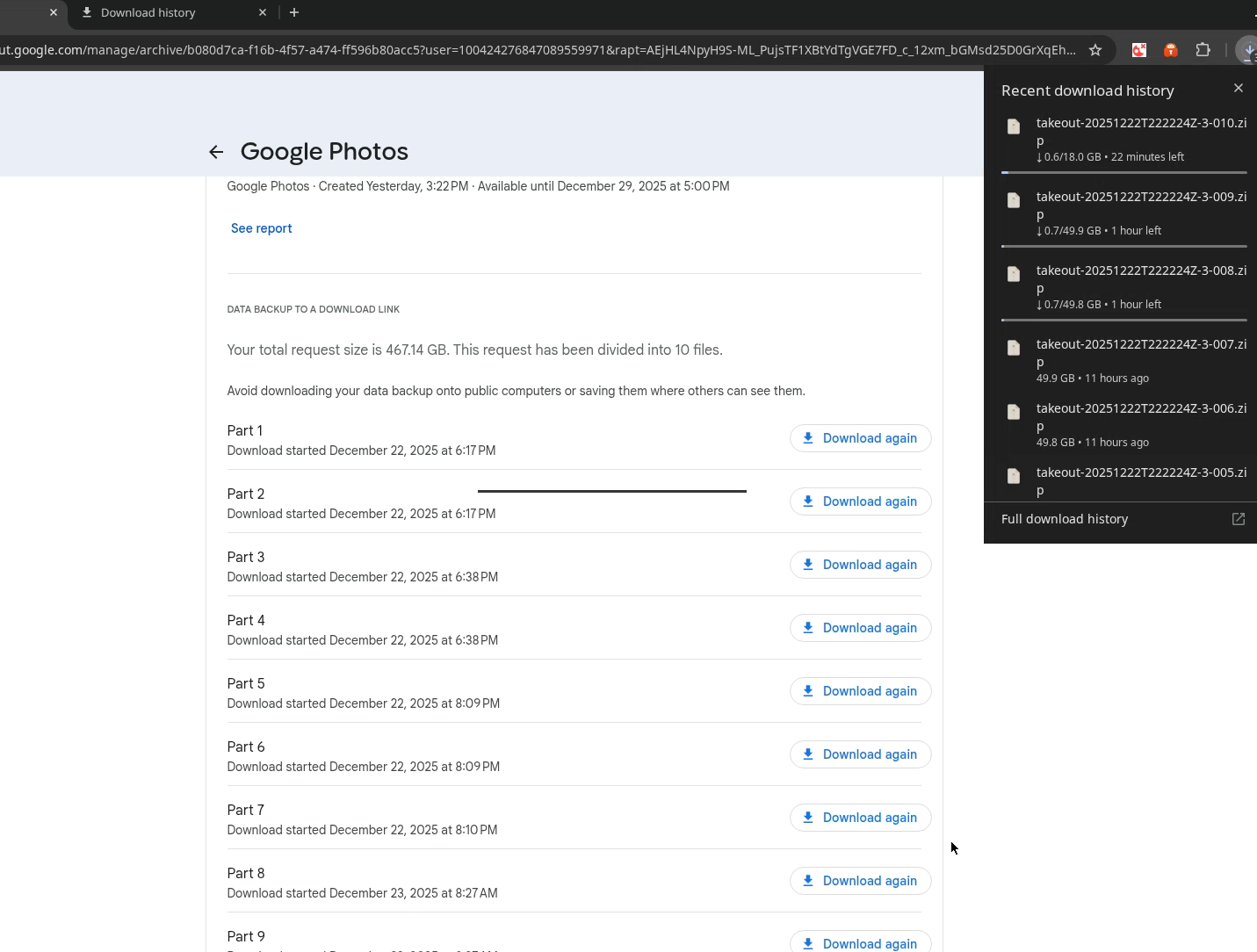 The files were downloaded in 50 GB blocks, I configured webtop to bind to the host with the same user that I was and was able to access all the files from the host without issue. The process took roughly a day’s worth of time waiting for downloads and migrating in .
Immich Go
Immich Go is a community maintained tool for migrating into Immich, all you have to do is download the latest version from Github, give it your command flags and go to town.
./immich-go upload from-google-photos --server=http://127.0.0.1:2283 --api-key=$API_KEY takeout-2025* --sync-albums --people-tag --takeout-tag -l $LOG_FILE$Note
Notice I’m using the localhost address, this is due to the fact that some uploads fails due to timeout settings in the reverse proxy. This will likely need to be addressed for mobile phone uploads as well but we’ll take care of that at another time.